Mac guide
How to open an .md file on Mac
Use TextEdit for the source, Quick Look for a preview, or a Markdown viewer for the rendered document.
All three methods below are free. Start with the one already on your Mac; install an app only if you want headings, tables, links and code to render properly.
Free · notarized by Apple · under 5 MB · no account · macOS 14+ · Apple silicon or Intel
Fast answer
Open the file once with an app you choose
- Control-click the .md file in Finder.
- Choose Open With.
- Choose TextEdit to inspect the raw Markdown, or choose a Markdown viewer to read it rendered.
If the file has no visible .md ending, open Finder Settings, choose Advanced and enable Show all filename extensions.
Method 1
Open the Markdown source in TextEdit
TextEdit is built into macOS and can open plain-text documents. Control-click the file, choose Open With, then TextEdit. You will see the Markdown characters themselves: headings start with #, emphasis uses asterisks and links use brackets.
- Best forChecking or making a small source edit
- CostFree; already on the Mac
- LimitationDoes not render Markdown formatting
Apple's TextEdit guide documents opening plain-text files through File > Open.
Method 2
Press Space for a Finder preview
Select the file in Finder and press Space. A standard Mac may show the raw text because macOS has no built-in Markdown renderer. To see rendered headings and code in that window, install and enable a Markdown Quick Look extension.
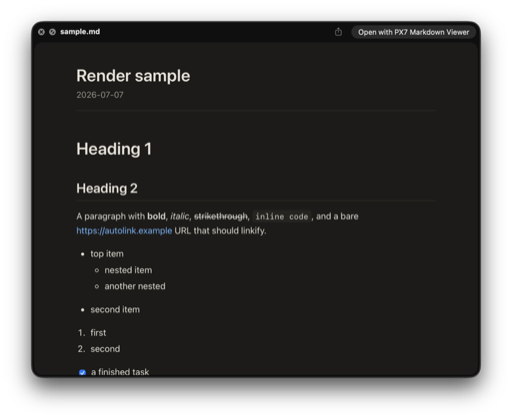
Use the separate Markdown Quick Look guide for the exact setup, free extension options and fixes when Finder keeps showing raw text.
Method 3
Open it as a rendered document
A Markdown viewer turns the punctuation into headings, lists, tables, links, code and images. PX7 Markdown Viewer is our free native option: it opens local files, adds Finder Quick Look and lets you switch to the source with Command-E.
Free · notarized by Apple · under 5 MB · macOS 14+ · Apple silicon or Intel
Default app
Make every .md file open with the same app
- Select one .md file in Finder and press Command-I.
- Expand Open with and choose the app.
- Click Change All, then confirm.
This changes all files of that type, not only the selected file. The steps follow Apple's Choose an app to open a file instructions.
Quick answers
Opening Markdown files on Mac
What app opens .md files on a Mac?
TextEdit can open the raw plain-text source. A Markdown viewer is better when you want headings, links, tables and code rendered as a readable document.
Can TextEdit open Markdown files?
Yes. TextEdit opens the file as plain text, so it shows the Markdown punctuation instead of rendering the formatting.
How do I preview an .md file in Finder?
Select the file and press Space. Install and enable a Markdown Quick Look extension if Finder shows raw text instead of rendered Markdown.
How do I change the default Markdown app on Mac?
Select an .md file, press Command-I, choose an app under Open with, then click Change All.
PX7 Digital makes PX7 Markdown Viewer. The built-in TextEdit method is listed first because it may be all you need. Apple instructions were checked on 27 August 2026. Something out of date? Tell us.