Markdown Quick Look for Mac: preview .md files in Finder
The 30-second fix, plus what to do when it does not take. Updated August 2026.
Install one Markdown Quick Look extension, open its app once, enable it under System Settings → General → Login Items & Extensions → Quick Look, then select a .md file in Finder and press space. Finder will show rendered Markdown instead of hash marks and asterisks.
Free · macOS 14+ · Quick Look preview, rendered open, and source editing.
The result
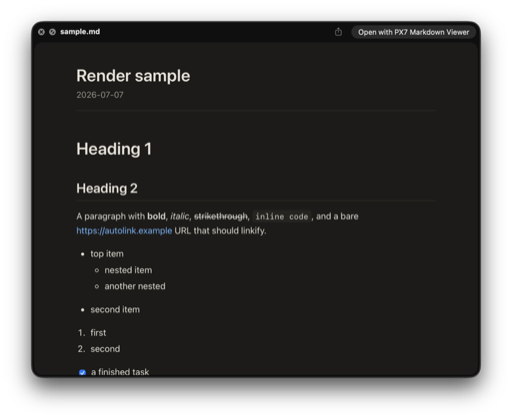
This is what Finder should show after you press Space.
Why it happens
macOS knows the file type and has nothing to render it
Worth knowing before you install anything, because it explains why no setting will turn this on. We checked it rather than repeating it — on macOS 26.5.2 (build 25F84, Apple silicon):
- mdls -name kMDItemContentType file.mdnet.daringfireball.markdown
- qlmanage -m plugins | grep -i markdownno result
- What ends up handling it/System/Library/QuickLook/Text.qlgenerator
So the system recognises .md as its own type, finds no generator for it, and falls back to plain text. Every fix below is an extension you add. There is no switch.
The fix
Install one generator and enable it
Any of these will do it. Pick on how you like installing things — the preview quality is broadly the same, and the differences matter later, not now.
- Homebrewbrew install --cask qlmarkdown
- Homebrew, with reader and editorbrew install --cask px7digital/tap/px7-markdown-viewer
- Mac App StoreMarkdown Preview, a few dollars
- Free, no accountReaddown, or download PX7 Markdown Viewer (ours)
Then switch the extension on, which macOS does not do for you:
- 1Open the app once so macOS registers its extension
- 2System Settings → General → Login Items & Extensions → Quick Look
- 3Enable the extension you just installed
- 4Select a .md file in Finder and press space
When it does not work
Four things that go wrong, in order of likelihood
Still raw text after enabling it
Quick Look caches its generator list. Run qlmanage -r in Terminal, then qlmanage -r cache. If that does not do it, log out and back in. A reboot is almost never what fixes this, despite what the forums say.
It worked, then stopped
Usually a second Markdown extension got installed and the two are competing — macOS picks one and it may not be yours. Go back to Login Items & Extensions and turn off every Markdown generator except one.
Some files preview and others do not
Check the extension, not the content. .markdown, .mdx and .txt files holding Markdown are different types as far as macOS is concerned, and not every generator claims all of them. QLMarkdown covers the widest set; Peekdown is the one to reach for if your files are MDX or Obsidian markup.
Preview works but the diagrams do not
Mermaid and LaTeX are not part of Markdown, so they only render if the generator implements them. QLMarkdown, Markdown Preview, MacMD Viewer and Readdown all do. If your diagrams show as code blocks, that is the generator, not your file.
Open instead of preview
How do you open an .md file on a Mac?
To inspect the source once, Control-click the file and choose Open With → TextEdit. To read rendered headings, tables and code, open it with a Markdown viewer. PX7 Markdown Viewer is free and can also edit the source without moving the file or uploading it.
To make one app handle every .md file, select a file in Finder, press ⌘I, choose the app under Open with, then click Change All. That is the standard macOS method documented by Apple Support.
For all three free options and the difference between raw source and rendered reading, see how to open an .md file on a Mac.
Quick answers
Markdown preview questions
How do I preview Markdown files in Finder on a Mac?
Install a Markdown Quick Look extension, open its app once, enable it under System Settings → General → Login Items & Extensions → Quick Look, then select a .md file in Finder and press space.
Why does Quick Look show raw Markdown text?
macOS recognises .md files but has no built-in Markdown renderer, so Quick Look falls back to a plain-text preview until an extension handles the file type.
How do I open .md files with the same app every time?
Select a .md file in Finder, press ⌘I, choose the app under Open with, then click Change All.
Is PX7 Markdown Viewer the same app as MacMD Viewer?
No. PX7 Markdown Viewer is our separate free app. MacMD Viewer is an unrelated product from another developer with its own website and pricing.
Once it works
What you might want next, and from whom
Quick Look previews. It does not open, and it does not edit. That distinction is what separates the options once the immediate problem is solved.
- QLMarkdownFree, open source · preview only · widest file-type coverage
- GlanceFree, open source · previews code, archives and notebooks too
- Markdown PreviewApp Store · KaTeX and Mermaid · rendered/source toggle
- ReaddownFree · adds a reader app · read-only by design · macOS 13+
- PeekdownApp Store · GFM, MDX and Obsidian · optional editing
- MacMD Viewer$19.99 once, 14-day refund · reader app built for long documents
- PX7 Markdown Viewer (ours)Free · preview, plus open and edit the file · macOS 14+
If you only ever preview, stop at the generator you installed — several of the above cost nothing and you are already done. Readdown is the one to look at if you want a proper reading window and will never edit. Ours exists for the case where preview is not the end of it: double-click opens the file rendered, ⌘E edits the source, ⌘S saves it back, in one app instead of an extension plus an editor.
PX7 Digital makes PX7 Markdown Viewer, so this page is not neutral. Prices, formats and system requirements for the other apps were taken from each product's own site on 31 July 2026, and the macOS behaviour above was checked on the machine and version named. Where a vendor does not publish a price, this page says so instead of guessing. Something out of date? Tell us.